• Advertisement

Make a small donation to Ye Olde Inn!

Donate via Paypal

Every cent received goes toward Ye Olde Inn's maintenance and allows us to continue providing the best resources for HeroQuest and Fantasy Gaming fans.

[Tutorial] - Card Images

Discuss card making and cards you have made.

Re: [Tutorial] - Card Images

Postby The Road Warrior » February 21st, 2013, 4:48 pm

drathe wrote:Image


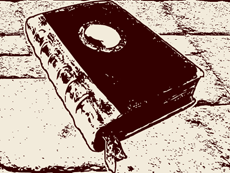
drathe, would you be able to create a slighty edited version of this book with a skull inside the circle on the front cover, perhaps the black shield from the dice?

I would like to use it as the necromancy book in the chronicles of Sir Ragnar if thats ok with you?
Image
Join in the community project.


Rewards:
Grin's Stone Map Hosted a Play-by-Post game. Played a turn in five (5) Play-by-Post games. Created a Hot Topic. Zealot Miniatures: Twisting Catacombs Kickstarter Backer Slain a measly Goblin! Slaughtered an Orc! Killed a mighty Fimir! Shattered a Skeleton! Destroyed a Zombie! Unravelled a Mummy! Crushed a powerful Chaos Warrior! Smashed a massive Gargoyle! Encountered all eight (8) Game System monsters. Encountered a menacing Chaos Warlock!
User avatar
The Road Warrior

Elven Warrior
Elven Warrior
 
Posts: 639
Joined: November 20th, 2012, 5:02 pm
Forum Language: British English
Hero:
Evil Sorcerer: Morcar
Usergroups:
Adventurers' Guild Group Member Champion Group Member

Advertisement

Make a small donation to Ye Olde Inn!

Donate via Paypal

Every cent received goes toward Ye Olde Inn's maintenance and allows us to continue providing the best resources for HeroQuest and Fantasy Gaming fans.

Re: [Tutorial] - Card Images

Postby Sjeng » February 21st, 2013, 5:16 pm

like this? Any text you want on it?

artefact-card-necrotome-sje.jpg
You do not have the required permissions to view the files attached to this post.
Check out my YouTube channel Boardgame Heaven, and drop me a sub please!


Rewards:
Grin's Stone Map Played a turn in a Play-by-Post game. Wrote twenty (20) articles for the Blog in three (3) sections. Created a Hot Topic. Participated in three (3) Miniature Exchanges. Zealot Miniatures: Twisting Catacombs Kickstarter Backer Slain a measly Goblin! Slaughtered an Orc! Killed a mighty Fimir! Shattered a Skeleton! Destroyed a Zombie! Unravelled a Mummy! Encountered a menacing Chaos Warlock!
User avatar
Official Spokesman
Sjeng
Ye Olde Orcish Bard

Wizard
Wizard
 
Posts: 4536
Images: 92
Joined: July 26th, 2011, 9:58 am
Location: The Netherlands
Forum Language: Nederlands
Hero:
Evil Sorcerer: Morcar
Usergroups:
Wizards of Zargon Group Member Adventurers' Guild Group Member Artists Group Member Champion Group Member Scribes Group Member

Re: [Tutorial] - Card Images

Postby The Road Warrior » February 21st, 2013, 5:21 pm

Haha so drathe and Sjeng are one and the same?

Thanks Sjeng, that's exactly what I wanted :D
Image
Join in the community project.


Rewards:
Grin's Stone Map Hosted a Play-by-Post game. Played a turn in five (5) Play-by-Post games. Created a Hot Topic. Zealot Miniatures: Twisting Catacombs Kickstarter Backer Slain a measly Goblin! Slaughtered an Orc! Killed a mighty Fimir! Shattered a Skeleton! Destroyed a Zombie! Unravelled a Mummy! Crushed a powerful Chaos Warrior! Smashed a massive Gargoyle! Encountered all eight (8) Game System monsters. Encountered a menacing Chaos Warlock!
User avatar
The Road Warrior

Elven Warrior
Elven Warrior
 
Posts: 639
Joined: November 20th, 2012, 5:02 pm
Forum Language: British English
Hero:
Evil Sorcerer: Morcar
Usergroups:
Adventurers' Guild Group Member Champion Group Member

Re: [Tutorial] - Card Images

Postby Sjeng » February 22nd, 2013, 2:09 am

I think drathe is already too busy as it is ;)
Check out my YouTube channel Boardgame Heaven, and drop me a sub please!


Rewards:
Grin's Stone Map Played a turn in a Play-by-Post game. Wrote twenty (20) articles for the Blog in three (3) sections. Created a Hot Topic. Participated in three (3) Miniature Exchanges. Zealot Miniatures: Twisting Catacombs Kickstarter Backer Slain a measly Goblin! Slaughtered an Orc! Killed a mighty Fimir! Shattered a Skeleton! Destroyed a Zombie! Unravelled a Mummy! Encountered a menacing Chaos Warlock!
User avatar
Official Spokesman
Sjeng
Ye Olde Orcish Bard

Wizard
Wizard
 
Posts: 4536
Images: 92
Joined: July 26th, 2011, 9:58 am
Location: The Netherlands
Forum Language: Nederlands
Hero:
Evil Sorcerer: Morcar
Usergroups:
Wizards of Zargon Group Member Adventurers' Guild Group Member Artists Group Member Champion Group Member Scribes Group Member

Re: [Tutorial] - Card Images

Postby Teldurn » April 22nd, 2014, 1:37 pm

Does anyone happen to know how to achieve the same end result, but without going through Inkscape first? In other words, how to do it in Photoshop only? I believe it should be able to be done, but for some reason I'm coming up blank.

The best I've been able to get is convert the image to greyscale, then adjust the brightness/contrast to get better black/white areas, and finally hit it with a pencil sketch filter. It doesn't look quite the same, so if anyone else has a better strategy, I'd love to hear it.
War is not the answer...unless the question is, 'What is not the answer?'

Check out Broadsword, a love letter to 90s dungeon crawling board games.


Rewards:
Created a Hot Topic. Destroyed a Zombie!Encountered a menacing Chaos Warlock!
User avatar
Teldurn

Giant Wolf
Giant Wolf
 
Posts: 787
Joined: October 18th, 2013, 5:22 pm
Forum Language: English (United States)
Hero:
Evil Sorcerer: Zargon
Usergroups:
Adventurers' Guild Group Member Artists Group Member Champion Group Member

Re: [Tutorial] - Card Images

Postby drathe » April 23rd, 2014, 3:25 pm

Photoshop only uses raster images. There is no easy way to do it in Photoshop alone that I'm aware of. But, I'm a photoshop novice to begin with.
Image


Rewards:
Played a turn in a Play-by-Post game. Wrote an article for the Blog. Created a Hot Topic. Participated in a Miniature Exchange. Zealot Miniatures: Twisting Catacombs Kickstarter Backer
User avatar
Lord
drathe
The Bastiferous!

Innkeeper
Innkeeper
 
Posts: 2935
Images: 103
Joined: August 16th, 2008, 2:55 pm
Location: Niagara Region, Ontario, Canada
Forum Language: British English
Hero:
Evil Sorcerer: Morcar
Usergroups:
Innkeepers Group Member Wizards of Zargon Group Member Adventurers' Guild Group Member Artists Group Member Champion Group Member Scribes Group Member

Re: [Tutorial] - Card Images

Postby chaoticprime » April 23rd, 2014, 3:58 pm

Inkscape is just the Threshold function in PS.


Rewards:
Created a Hot Topic. Participated in a Miniature Exchange. Zealot Miniatures: Twisting Catacombs Kickstarter Backer
User avatar
chaoticprime
Practically Lives Here

Swordsman
Swordsman
 
Posts: 1939
Images: 0
Joined: February 10th, 2013, 3:38 am
Location: Kansas City
Forum Language: English (United States)
Evil Sorcerer: Zargon
Usergroups:
Adventurers' Guild Group Member Artists Group Member Champion Group Member

Re: [Tutorial] - Card Images

Postby The Road Warrior » April 23rd, 2014, 4:18 pm

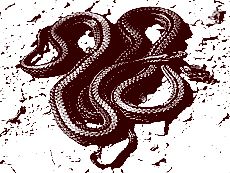
Teldurn wrote:The best I've been able to get is convert the image to greyscale, then adjust the brightness/contrast to get better black/white areas, and finally hit it with a pencil sketch filter. It doesn't look quite the same, so if anyone else has a better strategy, I'd love to hear it.


If your starting image is a colour image use a Brightness/saturation adjustment layer to remove the colour.
Next apply a levels adjustment layer and try playing around with the settings.

Don't convert the image to greyscale as you won't then be able to tint the image to match the HQ card images.

As drathe has already said, the result is not exactly as the image types are different.

To compare photoshop (left) with inkscape (right)
ImageImage
Image
Join in the community project.


Rewards:
Grin's Stone Map Hosted a Play-by-Post game. Played a turn in five (5) Play-by-Post games. Created a Hot Topic. Zealot Miniatures: Twisting Catacombs Kickstarter Backer Slain a measly Goblin! Slaughtered an Orc! Killed a mighty Fimir! Shattered a Skeleton! Destroyed a Zombie! Unravelled a Mummy! Crushed a powerful Chaos Warrior! Smashed a massive Gargoyle! Encountered all eight (8) Game System monsters. Encountered a menacing Chaos Warlock!
User avatar
The Road Warrior

Elven Warrior
Elven Warrior
 
Posts: 639
Joined: November 20th, 2012, 5:02 pm
Forum Language: British English
Hero:
Evil Sorcerer: Morcar
Usergroups:
Adventurers' Guild Group Member Champion Group Member

Re: [Tutorial] - Card Images

Postby gootchute » April 23rd, 2014, 6:46 pm

This is EPIC! I hope to see a bunch more unique images on cards.
•==(Broadsword>


Rewards:
Played a turn in a Play-by-Post game. Zealot Miniatures: Twisting Catacombs Kickstarter Backer Encountered a menacing Chaos Warlock!
gootchute

Ogre Chieftain
Ogre Chieftain
 
Posts: 224
Images: 12
Joined: May 13th, 2013, 4:28 pm
Forum Language: English (United States)
Evil Sorcerer: Zargon
Usergroups:
Artists Group Member Champion Group Member

Re: [Tutorial] - Card Images

Postby chaoticprime » April 25th, 2014, 2:24 am

I been playin around with this. Make sure to select the image (you didnt mention that in the OP, so I thought I would here).

A couple things you could do to improve your method (in Paths/Trace Bitmap) would be to deselect Stack Option, and then update your Brightness. Before you OK it, first go and select the nodule for Edge Detection and update it. This will give you good, strong, linearity. Once you've done this, update brightness again before you OK it.

It helps to take the image into Photoshop first, and then up its DPI to 600 or so, and then apply the Filters/Sharpen/Unsharp Mask/500/250.0/0.


Rewards:
Created a Hot Topic. Participated in a Miniature Exchange. Zealot Miniatures: Twisting Catacombs Kickstarter Backer
User avatar
chaoticprime
Practically Lives Here

Swordsman
Swordsman
 
Posts: 1939
Images: 0
Joined: February 10th, 2013, 3:38 am
Location: Kansas City
Forum Language: English (United States)
Evil Sorcerer: Zargon
Usergroups:
Adventurers' Guild Group Member Artists Group Member Champion Group Member

PreviousNext

Return to Cards

Who is online

Users browsing this forum: No registered users and 4 guests